docker run ~~~~ -u 123:123
version: "3"

services:
  sonarqube:
    image: wanted image-community
    user: "123:123"
    ports:
      - ~~~~~~~

위는 일반적인 도커 실행 명령어

아래는 docker compose 사용을 위한 docker-compose.yml


docker 명령어에는 -u 123:123으로 되어있고

docker-compose.yml 에는 user: "123:123"이 들어가있다.


컨테이너 내부에서 123:123 이라는 uid,gid 로 컨테이너가 실행되고

만약 호스트의 볼륨과 매핑되어 있다라고 한다면

매핑된 볼륨에 접근할때 123:123이라는 권한으로 접근한다.


컨테이너 실행시

권한 문제나 file not found 같은 문제가 발생한다면 참고 할만하다

기본적으로는 root로 실행된다고 한다.


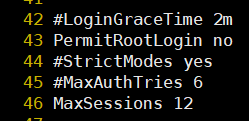
라는 메세지가 발생하였다.

/etc/ssh/sshd_config의 46번째 라인에서, MaxSessions 를 12로 늘려주어 해결


'Linux' 카테고리의 다른 글

ssh config ssd-add  (1) 2024.12.29
2 Too Many authentication failure  (1) 2024.12.02
Temporary failure resolving  (0) 2023.04.07
Linux) alias - 약어  (0) 2023.03.14
Linux) 기본명령어  (0) 2023.03.13
#! /bin/bash
  
echo "###################    count   #####################"

COUNT="$1/count"
timestamp=$(date "+%Y-%m-%d %H:%M:%S")

if [ ! -f "$COUNT" ]; then
        echo "$timestamp || task count=1" > "$COUNT"
        echo "start new project"
        current_count=$(tail -n 1 "$COUNT" | cut -d"=" -f2)
else
        before_count=$(tail -n 1 "$COUNT" | cut -d"=" -f2)
        echo "$before_count"
        current_count=$((before_count + 1))
        echo "$current_count"
        echo "$timestamp || task count=$current_count" >> "$COUNT"
fi


echo "####################################################"
echo "###################              ###################"
echo "###################   git pull   ###################"
echo "###################              ###################"
echo "####################################################"


for repo_path in $(find $1 -maxdepth 1 -type d)
do
    if [ -d "$repo_path/.git" ]; then
        echo "Pulling changes for repository: $repo_path"
        cd $repo_path
        git pull
        cd ../..
    fi
done

echo "####################################################"
echo "##############                      ################"
echo "##############     preparation      ################"
echo "##############                      ################"
echo "####################################################"


touch $1/utf-8
touch $1/list
touch $1/result
touch $1/iso
touch $1/us-ascii
touch $1/except


UTF="$1/utf-8"
ASCII="$1/us-ascii"
ISO="$1/iso"
LIST="$1/list"
RESULT="$1/result"
EXCEPT="$1/except"
LOG="$1/except-log"
ORIGIN="$1/original-encoding"

if [ ! -f "$LOG" ]; then
        touch $1/except-log
fi


if [ ! -f "$ORIGIN" ]; then
        touch "$ORIGIN"
fi


> "$EXCEPT"
> "$ASCII"
> "$ISO"
> "$LIST"
> "$RESULT"
> "$UTF"

echo "####################################################"
echo "##############                        ##############"
echo "##############  make a LIST of files  ##############"
echo "##############                        ##############"
echo "####################################################"


find /PATH/$1 -type f -name '*.pas'> "$LIST"
#grep -vE 'F[0-9A-Za-z].pas' > "$LIST" 
#| grep -E 'U([1-9]|10)\.pas'> "$LIST"

echo "####################################################"
echo "##############                        ##############"
echo "##############    classfy encoding    ##############"
echo "##############                        ##############"
echo "####################################################"


if [ "$current_count" == "1" ]; then
        while IFS= read -r cases; do
                encoding=$(file -ib "$cases" | cut -d'=' -f2)
                echo "$timestamp :: $files :: $encoding" >> $ORIGIN
        done < "$LIST"
fi

while IFS= read -r files; do
        fileset=$(file -ib "$files")
        encoding=$(file -ib "$files" | cut -d'=' -f2)
        if [ "$encoding" == "utf-8" ]; then
            echo "$files" >> "$UTF"
        elif [ "$encoding" == "us-ascii" ]; then
            echo "$files" >> "$ASCII"
        elif [ "$encoding" == "iso-8859-1" ]; then
            echo "$files" >> "$ISO"
        else
            echo "$files" >> "$EXCEPT"
        fi
done < "$LIST"
echo ""
echo ""
echo "####################################################"
echo "#############                           ############"
echo "############# convert us-ascii to UTF-8 ############"
echo "#############                           ############"
echo "####################################################"
echo ""
echo ""
while IFS= read -r line; do
        iconv -f "us-ascii" -t UTF-8 "$line" >  tempfile && mv -f tempfile "$line"
        echo "$line ::: done" >> "$RESULT"
done < "$ASCII"

echo "##################################" >> "$RESULT"

echo ""
echo ""
echo "####################################################"
echo "############                             ###########"
echo "############ convert iso-8859-1 to UTF-8 ###########" 
echo "############                             ###########"
echo "####################################################"
while IFS= read -r line; do
        iconv -f "iso-8859-1" -t UTF-8 "$line" >  tempfile && mv -f tempfile "$line"
        echo "$line ::: done" >> "$RESULT"
done < "$ISO"

echo "##################################" >> "$RESULT"

echo ""
echo ""
echo "####################################################"
echo "###########                             ############"
echo "###########      reporting result       ############"
echo "###########                             ############"
echo "####################################################"
while IFS= read -r files; do
        fileset=$(file -ib "$files")
        encoding=$(file -ib "$files" | cut -d'=' -f2)
            echo "$files - $fileset" >> "$RESULT"
done < "$LIST"
echo ""
echo ""
echo "####################################################"
echo "###########                             ############"
echo "###########      set exception file     ############" 
echo "###########                             ############"
echo "####################################################"                                                                                                                                                       
while IFS= read -r exclus; do
        except=$(echo $exclus | cut -d' ' -f1)
        mv "$except" "$except-except"

        echo "$timestamp $exclus" >> "$LOG"
done < "$EXCEPT"
echo ""
echo ""
echo "####################################################"
echo "###########                             ############"
echo "###########   encoding conversion zip   ############"
echo "###########                             ############"
echo "####################################################"

zip -r ./$1.zip ./$1
echo ""
echo ""
echo "####################################################"
echo "###########                             ############"
echo "###########             done            ############"
echo "###########                             ############"
echo "####################################################"


저렇게 프로젝트 마다 변수를 활용하고 싶은 경우


Ant script

<property name="name" value="${env.NAME}">
<echo message="NAME is set to: ${name}"/>
<echo message="NAME is set to: ${env.NAME}"/>
<echo message="NAME is set to: ${NAME}"/>

4번째 줄의 ${NAME}을 사용한다.

env.NAME은 젠킨스 전체의 경우에 사용되는 듯 하다.

+ Recent posts